
JavaScript Temporal Instant
The Temporal.Instant Object
The Temporal.Instant object represents an exact moment in UTC time.
UTC time has NO time zone or calendar.
Example: 2026-05-17T14:30:00Z
Example
May 17, 2026 at 14:30:00 UTC time:
const instant = Temporal.Instant.from("2026-05-17T14:30:00Z");
Try it Yourself »
The Z at the end of the date stands for Zero time.
The T in the middle is a separator between date and time.
What is UTC Time?
UTC stands for Universal Time Coordinated.
- It is the exact time on the zero meridian (Greenwich, London)
- It is the same moment everywhere on earth
- It is not affected by any time zones
- It is not affected by DST (Daylight Saving Time)
Prior to 1972, UTC was called Greenwich Mean Time (GMT).
Is now referred to as Universal Time Coordinated (UTC).
Is also referred to as Coordinated Universal Time.
What is Instant Time?
- It is measured in UTC
- It is stored as nanoseconds since Unix epoch
- Unix epoch is January 1, 1970 00:00:00
What is Local Time
To obtain local time in world, you need to add or subtract hours from UTC depending on how many time zones you are away from Greenwich.
Example
London: 12:00 (UTC)
Oslo: 14:00 (UTC+2)
New York: 08:00 (UTC-4)
Tokyo: 21:00 (UTC+9)
How to Create a Temporal.Instant
An Instant can be created in several different ways:
| From | Code |
|---|---|
| With Constructor | new Temporal.Instant() |
| From String | Temporal.Instant.from() |
| From Epoch millisec | Temporal.Instant.fromEpochMilliseconds() |
| From Epoch nanosec | Temporal.Instant.fromEpochNanoseconds() |
| From Current Time | Temporal.Now.instant() |
Create an Instant from new
You can create an Instant using the new Temporal.Instant() constructor.
The n at the end means BigInt.
The parameter must be a BigInt.
Create an Instant from a String
You can create an Instant from an RFC 9557 string.
What is the Z at the End?
The Z at the end of the time, is the ISO 8601 standard for formatting UTC time.
It indicates that the offset from UTC time is 0 (Zero).
It is also known as Z time, Zero time or Zulu time.
The T in the middle is the ISO 8601 standard for separating date and time.
Create an Instant from Epoch Milliseconds
You can create an Instant object from the number of milliseconds since the Unix epoch.
Unix epoch is at January 1, 1970 00:00:00 UTC
This is similar to how JavaScript Date works internally.
Create an Instant from Epoch Nanoseconds
You can create an Instant object from the number of nanoseconds since the Unix epoch.
Example
const instant = Temporal.Instant.fromEpochNanoseconds(1779028200000000000n);
Try it Yourself »
Create an Instant from Current Time
JavaScript Temporal.Instant does not have any method for creating an instant from current time.
You must use a Temporal.Now method instead.
The Temporal.Now.instant() method returns an Instant object with the exact current time.
HowTo Replace Date.now()
With Date, you use Date.now() to get the current
timestamp.
The Date.now() method returns the timestamp value in
milliseconds:
With Temporal, you use Temporal.Now.instant():
The property epochMilliseconds returns the timestamp value in
milliseconds:
Example
const instant = Temporal.Now.instant();
let timestamp = instant.epochMilliseconds;
Try it Yourself »
The property epochNanoseconds returns the timestamp value in
nanoseconds:
Example
const instant = Temporal.Now.instant();
let timestamp = instant.epochNanoseconds;
Try it Yourself »
Nanosecond precision is 1,000,000 (one million) times higher than millisecond precision.
Temporal.Instant compare()
Example
// Create Temporal.Instant objects
const i1 = Temporal.Instant.from("2026-05-17T12:00:00Z");
const i2 = Temporal.Instant.from("2026-05-17T12:00:00Z");
const i3 = Temporal.Instant.from("2026-05-17T13:00:00Z");
// compare()
let x1 = Temporal.Instant.compare(i1, i2));
let x2 = Temporal.Instant.compare(i1, i3));
let x3 = Temporal.Instant.compare(i3, i1));
Try it Yourself »
Temporal.Instant equals()
Example
// Create Temporal.Instant objects
const i1 = Temporal.Instant.from("2026-05-17T12:00:00Z");
const i2 = Temporal.Instant.from("2026-05-17T12:00:00Z");
const i3 = Temporal.Instant.from("2026-05-17T13:00:00Z");
// equals()
let x1 = i1.equals(i2);
let x2 = i1.equals(i3);
Try it Yourself »
All temporal objects have their own compare() method:
- Temporal.Instant.compare(instant1, instant2)
- Temporal.PlainDate.compare(plaindate1, plaindate2)
- Temporal.PlainTime.compare(plaintime1, plaintime2)
- Temporal.PlainYearMonth.compare(plainyearmonth1, plainyearmonth2)
- Temporal.PlainMonthDay.compare(plainmonthday1 plainmonthday2)
- Temporal.PlainDateTime.compare(plaindatetime1,plaindatetime2)
- Temporal.ZonedDateTime.compare(zoneddtatime1, zoneddtatime2)
- Temporal.Duration.compare(duration1, duration2)
Most (*) temporal objects have their own equals() method:
- instant.equals(instant)
- plaindate.equals(plaindate)
- plaintime.equals(plaintime)
- plainyearmonth.equals(plainyearmonth)
- plainmonthday.equals(plainmonthday)
- plaindateTime.equals(plaindatetime)
- zoneddateTime.equals(zoneddtatime)
(*) Duration has not.
Learn More:
Convert Instant Time to Local Time
A Temporal.Instant does not include time zone information.
You must convert it to a Temporal.ZonedDateTime to display local time.
The toZonedDateTimeISO() method converts a UTC moment
to a specific time zone:
Example
const instant = Temporal.Instant.from("2026-05-17T14:30:00Z");
const zoned = instant.toZonedDateTimeISO("Europe/Oslo");
Try it Yourself »
Instant = "What time is it globally?"
ZonedDateTime = "What time is it here?"
UTC vs Local Time
UTC is a global clock.
Time zone is the local view of the same clock.
| Type | Description |
|---|---|
| UTC | Same worldwide |
| Local Time | Depends on Location |
UTC (Coordinated Universal Time) is the standard time used worldwide.
It is not affected by any time zones or daylight saving time.
Why UTC is Important
UTC is used as a reference time:
- Servers and databases store time in UTC
- Logs use UTC timestmps to avoid ime confusion
- Most APIs use UTC timestamps
When to Use Temporal.Instant
- For exact moments in UTC time
- For timestamps
- For database logs
- For event logs
- For comparing moments
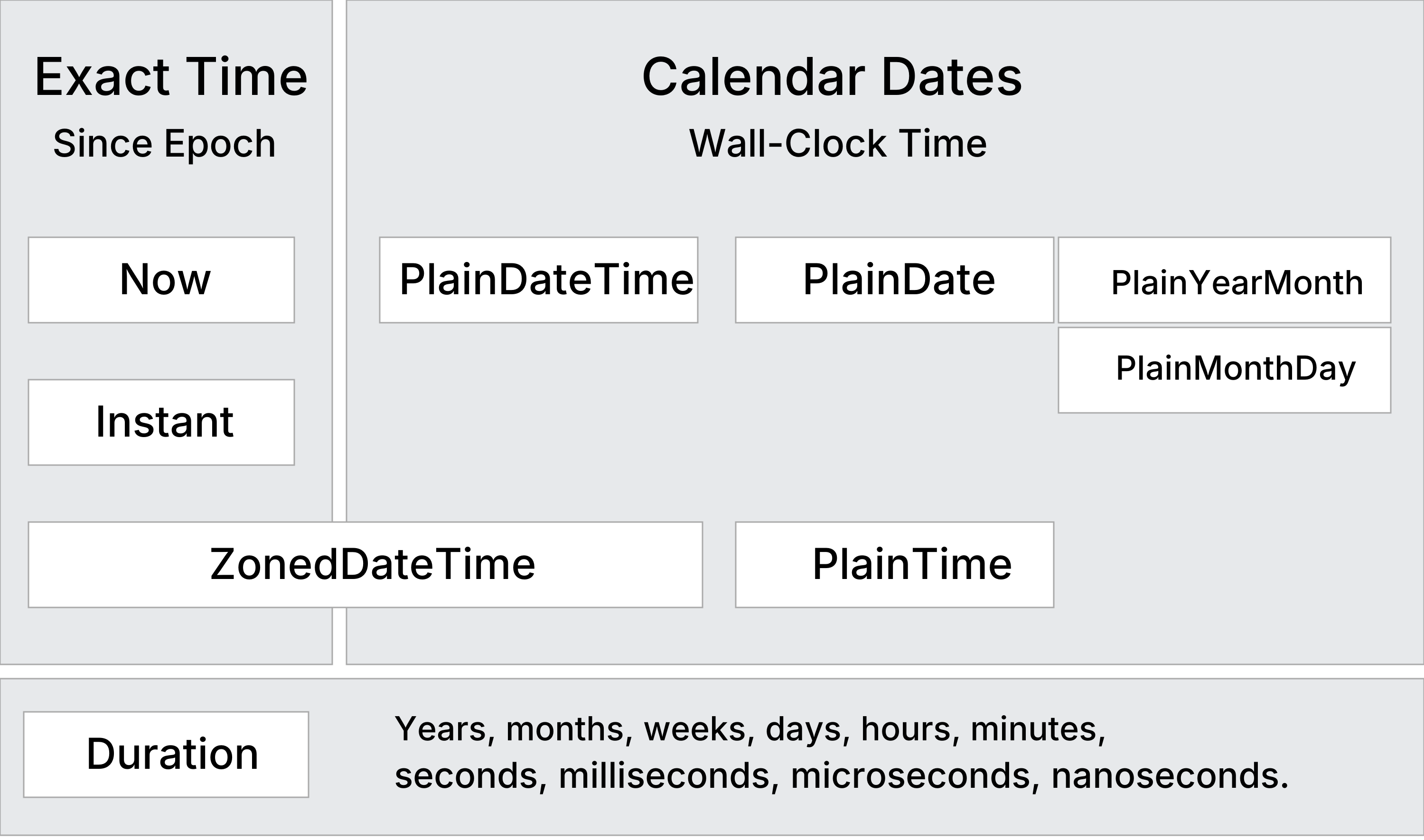
Compare Instant with Other Types
| Type | Meaning |
|---|---|
| Instant | Exact Moment in UTC time |
| PlainDateTime | Plain Date and Time (No Timezone) |
| ZonedDateTime | Local Date and Time (+ Time Zone) |
Temporal.Instant Methods
| Constructing | Description |
|---|---|
| new | Creates a new Temporal.Instant object |
| from() | Creates a new Instant object from another instant or a string |
| fromEpochMilliseconds() | Returns a new Instant object from a number of milliseconds |
| fromEpochNanoseconds() | Returns a new Instant object from a number of nanoseconds |
| Arithmetic | |
| add() | Returns a new Instant with a duration added |
| round() | Returns a new Instant with this instant rounded |
| subtract() | Returns a new Instant with a duration subtracted |
| Comparing | |
| compare() | Returns -1, 0, or 1 from comparing two instants |
| equals() | Returns true if two instants are identical |
| since() | Returns the duration since another date |
| until() | Returns the duration until another date |
| Converting | |
| toZonedDateTimeISO() | Returns a new ZonedDatetime object |
| Formatting | |
| toJSON() | Returns an RFC 9557 format string for JSON serialization |
| toLocaleString() | Returns a language-sensitive representation of the instant |
| toString() | Returns an RFC 9557 format string representation of the instant |
| valueOf() | Throws a TypeError (Instants should not be converted to a primitives) |