
JavaScript JSON Values
JSON Value Types
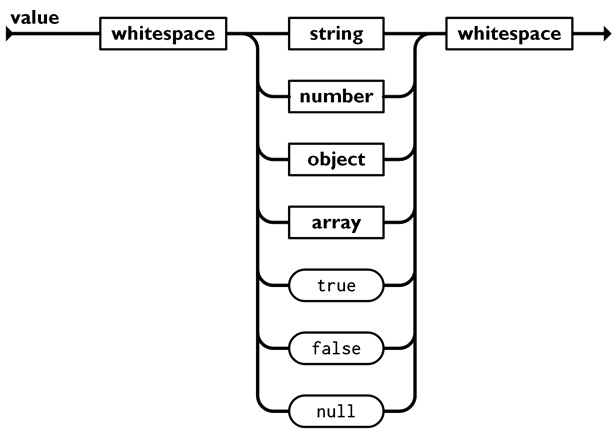
In JSON, values must be one of the following data types:
| Type | Example |
|---|---|
| String | "John" |
| Number | 30 |
| Object | {"name":"John"} |
| Array | ["red","green"] |
| Boolean | true |
| Null | null |
JSON Objects
A JSON object is enclosed in curly braces { }.
A JSON object contains one or more properties.
Example
{
"name": "John",
"age": 30,
"city": "New York"
}
Properties comes in name/value pairs.
Names must be strings enclosed in double quotes.
Values can be any valid JSON value:
| Type | Description |
|---|---|
| String | A sequence of characters enclosed in double quotes |
| Number | An integer or floating-point number |
| Boolean | The literal values true or false |
| Null | The literal value null to indicate the absence of a value |
| Array | An list of values enclosed in square brackets |
| Object | A collection of key/value pairs enclosed in curly braces |
Property values can be objects.
Example
{
"employee":{"name":"John", "age":30, "city":"New York"}
}
Property values can be arrays:
Example
{
"employees":["John", "Anna", "Peter"]
}
JSON Arrays
A JSON array is enclosed in square brackets [ ].
An array contains an ordered list of values.
Example
[
"Ford",
"Volvo",
"BMW"
]
Array values can be any valid JSON value.
| Type | Description |
|---|---|
| String | A sequence of characters enclosed in double quotes |
| Number | An integer or floating-point number |
| Boolean | The literal values true or false |
| Null | The literal value null to indicate the absence of a value |
| Array | An list of values enclosed in square brackets |
| Object | A collection of key/value pairs enclosed in curly braces |
Nested Values
Objects and arrays can contain other objects and arrays.
Example
{
"name": "John",
"age": 30,
"address": {
"city": "New York",
"country": "USA"
},
"hobbies": [
"Reading",
"Cycling",
"Photography"
]
}
Nested objects and arrays make it possible to represent complex data structures.
JSON String values
A JSON string value is a sequence of zero or more Unicode characters enclosed in double quotes.
Examples
""
"Hello World!"
"He said, \"Hello!\""
"\u00A9 2026"
{
"name": "John"
"city" : "New York"
}
JSON strings represent special characters using a backslash (\) escape syntax:
- \" for double quotes
- \/ for slash
- \\ for backslash
- \b for backspace
- \f for formfeed
- \n for linefeed
- \r for carriage return
- \t for horizontal tab
- \uXXXX for exact Unicode characters
To be valid, JSON strings require double quotes (unlike JavaScript, which permits single quotes).
JSON Number Values
JSON number values can be integers or floating-point numbers.
Example
{
"age": 30,
"height": 1.82
"speed_of_light": 2.997e8
}
JSON does not distinguish between different numeric types. It treats integers and floating-point decimals under a single "number" category.
| Type | Description | Example |
|---|---|---|
| Integers | Positive or negative whole numbers | -7 42 |
| Fractions | Numbers containing a decimal point followed by at least one digit |
-0.5 3.14 |
| Exponents | Numbers using e/E to indicate power of 10 | 1.0e-2 for 0.01 2.5E3 for 2500 |
JSON numbers requires absolute structural precision.
Many formats allowed in standard programming languages will break a JSON parser:
| Error | Description |
|---|---|
| No Quotes | "42" turns the value into a JSON string. |
| No Leading Zeros | Integers can not be padded with zeros (05). |
| No Leading Plus Signs | Numbers cannot start with plus (+42). |
| No Number Constants | NaN, Infinity, and -Infinity are invalid. |
| No Non-Decimal | Hexadecimal and Octal formats are invalid (0x7A). |
JSON Boolean Values
JSON supports the Boolean values true and false.
Example
{
"member": true,
"student": false
}
| Rule | Description |
|---|---|
| No Quotation | "true" turns the value into a JSON string. |
| Lowercase | Variations like TRUE, FALSE, True, or False are invalid. |
| No Numbers | JSON does not accept numbers like 1 or 0 as boolean replacements. |
JSON Null
The value null represents an empty value.
Example
{
"middleName": null
}
undefined Is Not a JSON Value
JSON supports null, but not undefined.
Wrong
{
"city": undefined
}
Correct
{
"city": null
}
Unsupported JavaScript Values
JSON has a small, strict syntax.
These JavaScript values cannot be represented in JSON:
| JavaScript Value | JSON |
|---|---|
| Function | No |
| Date | No |
| Symbol | No |
| BigInt | No |
| NaN | No |
| Infinity | No |
| undefined | No |
These values must be converted before they can be stored as JSON.
Date Values
Date objects are not allowed in JSON.
If you need to include a date, write it as a string.
You can convert it back into a date object later:
Example
const text = '{"name":"John", "birth":"1986-12-14"}';
Functions as Values
Wrong
{
"greet": function() {return "Hello"}
}
If you need to save a function, save it as a string.
You can convert it back into a function later.
Example
const text = '{"name":"John", "age":"function () {return 30;}';
Convertion Values
You will learn more about converting JavaScript values in the next chapters.
Both JSON.parse() and JSON.stringify() have options to convert values between formats.